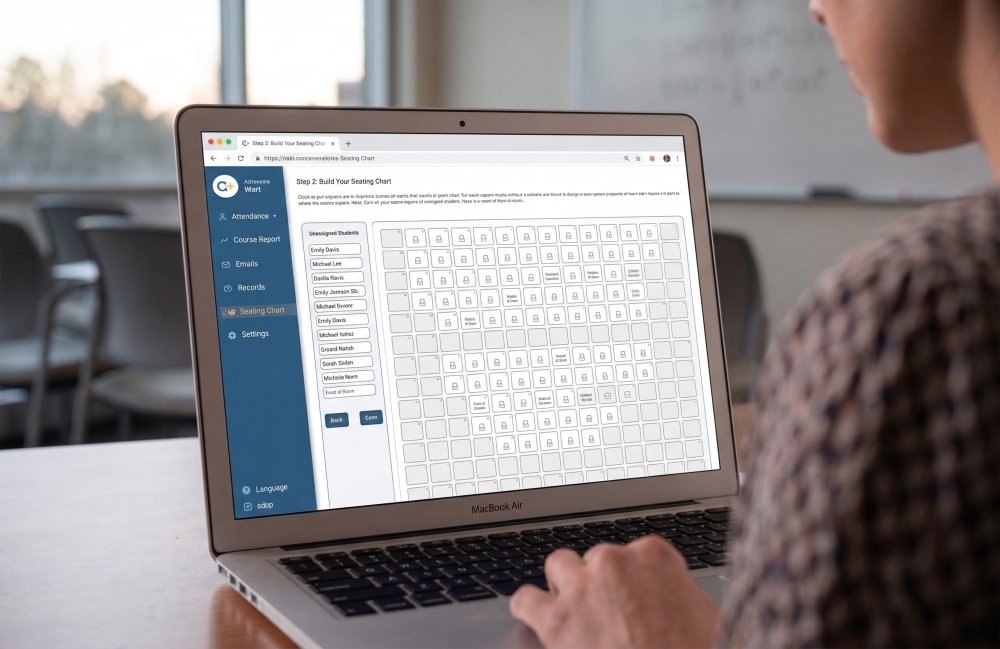
CLEVELAND, OH — September 1, 2026 — Qwickly is pleased to announce a significant expansion of Seating Chart Mode in Qwickly Attendance. Beginning with the Fall 2026 semester, instructors are no longer limited to the fixed 10 x 10 and 20 x 5 layouts. Seating charts can now be built at any grid size from 1 x 1 up to 50 x 50, allowing the chart on screen to finally match the room students are actually sitting in.
Real Classrooms Are Not 10 x 10
Seating Chart Mode gives instructors a visual, spatial way to take attendance: click a seat instead of scrolling a roster, and use student photos to learn names and faces faster. But campuses are full of rooms that a 100-seat grid simply could not describe. Tiered lecture halls fan outward with back rows wider than the front. Simulation labs and studios run long and narrow, with paired stations down the length of the room. Seminar rooms seat twelve around a single table. Law school classrooms routinely exceed one hundred students in a single section.
Until now, instructors in those spaces had to approximate: compressing a wide back row, splitting one room across two charts, or abandoning the mode entirely for larger sections. The new flexible grid removes that ceiling.
Any Grid, from 1 x 1 to 50 x 50
Building a seating chart works exactly as it did before, with one difference: rather than choosing from preset layouts, instructors specify the number of rows and columns their room requires.
- Set the dimensions. Choose any combination of rows and columns up to 50 x 50 — a 12 x 15 lecture hall, a 4 x 45 lab, a 3 x 4 seminar table, or anything in between. At the upper limit, a single chart can hold up to 2,500 seats.
- Shape the room. Empty cells continue to work exactly as they always have, marking aisles, walkways, unoccupied desks, and clusters of pods so the chart reflects the real geometry of the space.
- Place students and take attendance. Students are assigned to seats by clicking a name and then a seat, and attendance is taken with a single click on that seat. Student photo integration carries through at every grid size, which remains one of the mode's most valuable features for substitutes and for large sections where names take a semester to learn.
Existing seating charts are unaffected. Charts already built on the 10 x 10 or 20 x 5 layouts remain intact and continue to work without any action required from instructors or administrators.
Flexible Grids Come to Enterprise Seating Charts
The expanded grid sizes are also available in the enterprise seating charts within Qwickly Attendance's Location Manager. Administrators defining institutional spaces centrally can now build room layouts at the same 1 x 1 to 50 x 50 range, so a lecture hall or lab configured once at the campus level carries an accurate footprint into every course scheduled in it.
For institutions standardizing attendance practice across departments, this means the physical map of campus and the seating charts instructors use every day finally describe the same rooms. Enterprise seating charts in Location Manager require a license of Qwickly Attendance Pro.
Availability
Flexible seating chart grids are available to all institutions licensing Qwickly Attendance Plus or Qwickly Attendance Pro, at no additional cost. Enterprise seating charts in Location Manager require a license of Qwickly Attendance Pro. As with all seating chart functionality, the mode must be enabled by the LMS administrator before instructors will see it in their courses.
To learn more about how Qwickly Attendance can transform the administrative and classroom experience at your institution, visit www.goqwickly.com.